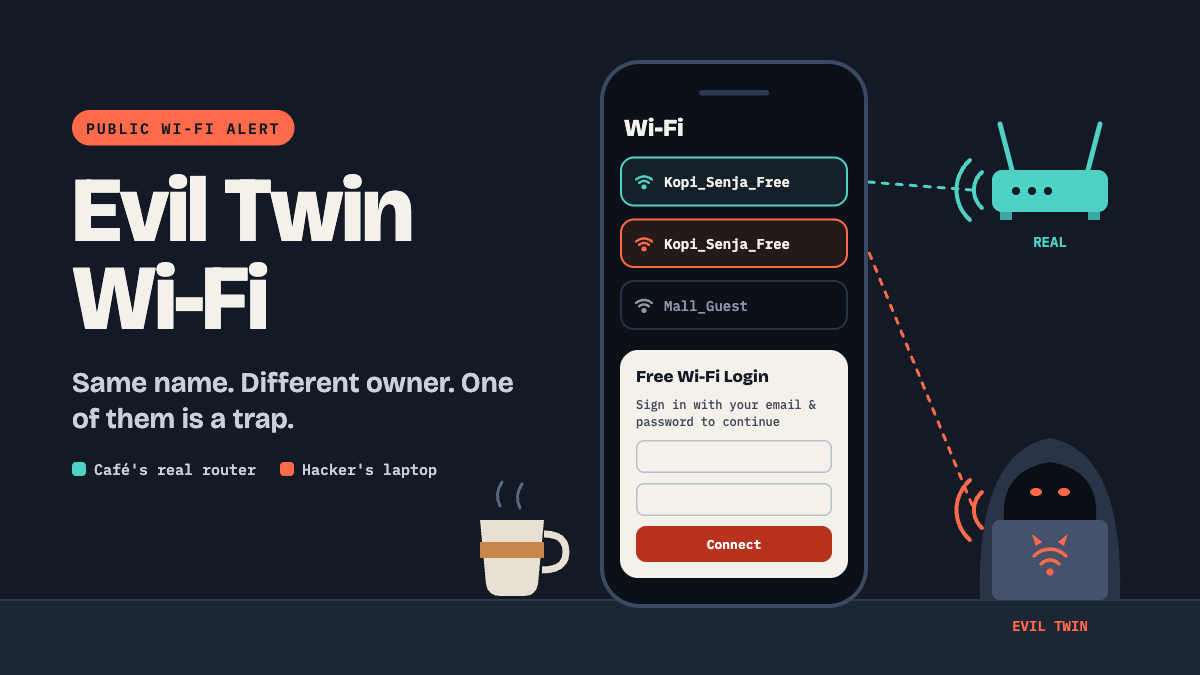
You walk into a café, see "Kopi_Senja_Free," and tap connect without thinking. Totally normal. But what if that network was set up by the guy at the corner table, not the café?
1. Evil Twin: A Fake Network Using a Real Name
- The Vibe: It's like a fake ATM stuck on top of the real one. It looks legit, but everything you type goes straight to a scammer.
- The Simple Example: A hacker creates a hotspot called "Airport_Free_WiFi" from his laptop. Your phone joins it, and now he can see what you browse or show you a fake login page.
- Red Flags: Two networks with nearly identical names, or a pop-up asking for your email or bank login just to "get online."
2. Staying Safe: Treat Public Wi-Fi Like a Public Toilet
- The Vibe: Use it if you have to, but don't leave anything valuable behind.
- The Simple Example: You need to transfer money at the mall. Instead of using the free Wi-Fi, you switch to mobile data for two minutes. Done, and safe.
- Pro Tip: Ask staff for the exact network name, and use a VPN (an app that wraps your connection in a private, mitigate the risk of being sniffed)
In short: free Wi-Fi is convenient, but an evil twin can steal everything you type. Today, open your phone settings and turn off auto-join for public networks.